
BILLBOARD HOT 100
Billboard Hot 100 is one of the most prestigious and widely recognized music charts in the United States ONLY, published weekly by Billboard magazine. It ranks the top 100 songs in the country, based on a combination of factors that reflect a song's popularity across different platforms and mediums. It's the combination of streams, digital and physical sales and radio airplays.
Factors contributing to the Billboard Hot 100:
- SALES
- Digital Sales
Digital Sales refer to the purchase of music tracks or albums in a digital format, typically through online platforms like iTunes and Amazon Music. When a consumer buys a song or an album online, this transaction counts as a digital sale.
- Itunes
- Quboz
- Amazon Music
- Tidal
- BTS US Store (For album only)
- Physical Sales
Physical sales refer to the purchase of music in a physical format, such as CDs, vinyl records, or cassette tapes. These sales occur in brick-and-mortar stores, online retailers that ship physical products, or during special events like album signings.
- BTS US Store
- Amazon
- Walmart
- Target
- Barnes and Noble
- Weverse USA
- Digital Sales
- STREAMS
- Audio Streams
- Apple Music
- Spotify
- Youtube Music
- Amazon Music
- Pandora
- Tida
- AudioMack
- Deezer
- Video Streams
- Youtube
- Apple Music
- RADIO PLAYS
Also known as airplay, refers to how often a song is played on radio stations across various formats, and it is a key factor in determining a song's position on the Billboard Hot 100. The radio play that counts towards the Billboard Hot 100 is collected from a wide range of radio stations and networks across the United States.
BILLBOARD 200
Billboard 200 is a music chart published weekly by Billboard magazine that ranks the Top 200 Albums in the United States based on sales, streaming, and airplay data. It reflects the most popular albums across various genres and is a key indicator of an album's success in the market. It counts USA data only.
Factors contributing to the Billboard 200:
- Album Sales
Pure album sales, both physical (like CDs, vinyl) and digital downloads, contribute significantly to chart positions.
- Ditigal Sales
- iTunes
- Amazon
- Quboz
- BTS US Store (for album only)
- Physical Sales
- BTS US Store
- Amazon
- Target
- Barnes and Noble
- Walmart
- Weverse USA Shop
- Track Equivalent Albums (TEA)
This metric is based on individual song downloads from an album. Ten digital track sales from an album are equivalent to one album sale. 10 digital track sales = 1 album sale
- Streams
- 1,250 paid/subscription on-demand audio/video streams = 1 album sale
- 3,750 free audio/video streams = 1 album sale
- Spotify
- Youtube
- Apple Music
- Amazon Music
- Pandora
Tracking period is from Friday to Thursday (EST).
Top 10 songs were posted every Monday, whole chart being updated every Tuesday (EST).
BILLBOARD GLOBAL 200
Billboard Global 200 chart ranks the top 200 songs globally based on a combination of digital stream and digital sales data. It reflects the popularity of songs across multiple countries or globally.
It does not include Physical Sales. Factors Contributing to the Billboard Global 200:
- Digital Sales
Digital Sales refer to the purchase of music tracks or albums in a digital format, typically through online platforms like iTunes and Amazon Music. When a consumer buys a song or an album online, this transaction counts as a digital sale.
1 track sales = 200 Premium Paid Streams / 900 Free Streams- iTunes
- Amazon
- Quboz
- BTS US Store (for USA only)
- Streams
- Audio Streams
- Video Streams
- Spotify
- Apple Music
- Amazon
- Pnadora
- Deezer
- Youtube Music
- Youtube
- User Engagement
Social Media buzz and engagement can drive streaming and sales especially when the song go viral.
Tracking period is from Friday to Thursday (EST).
Top 10 songs were posted every Monday, whole chart being updated every Tuesday (EST).
BILLBOARD GLOBAL 200 exl USA
Billboard Global 200 excl USA chart ranks top 200 songs globally excluding USA. It is the combination of digital streams and sales.
It does not include Physical Sales. Factors Contributing to the Billboard Global 200 excl USA:
- Digital Sales
Digital Sales refer to the purchase of music tracks or albums in a digital format, typically through online platforms like iTunes and Amazon Music. When a consumer buys a song or an album online, this transaction counts as a digital sale. 1 track sales = 200 Premium Paid Streams / 900 Free Streams.
- Itunes
- Amazon
- Streams
- Audio Streams
- Video Streams
- Spotify
- Apple Music
- Deezer
- Youtube Music
- Youtube
- User Engagement
Social Media buzz and engagement can drive streaming and sales especially when the song go viral.
Tracking period is from Friday to Thursday (EST).
Top 10 songs were posted every Monday, whole chart being updated every Tuesday (EST)
BILLBOARD ARTIST 100
Billboard Artist 100 chart ranks the most popular musical artists in the U.S. across all genres. It combines various metrics to provide a comprehensive view of an artist's overall popularity.
Factors that contributes to this chart:
- Song Sales
Tracks digital downloads of an artist's songs, contributing to their overall ranking.
- Album Sales
Includes sales of albums by the artist, both physical and digital formats.
- Streaming data
Incorporates streams from platforms like Spotify, Apple Music, and other streaming services, reflecting how frequently an artist's music is played.
- Radio Airplay
While it provides a comprehensive view of an artist's success in the U.S., it does not incorporate global sales or streaming data from international markets.
DIGITAL SONG SALES
Billboard Digital Song Sales chart is a weekly ranking of the top-selling songs in the United States based on paid digital downloads. Compiled by Luminate (formerly Nielsen SoundScan), it reflects which tracks fans are purchasing most during the tracking week. Unlike streaming or radio charts, this chart measures only digital sales transactions.
Sales contributors include:
- Itunes
- Amazon
- Other U.S. online music download retailers tracked by Luminate (e.g., 7Digital, Qobuz, Tidal Store).
Note:Only U.S. digital purchases count. Streaming and international store purchases (outside the U.S.) are not included.
WOLRD DIGITAL SONG SALES
Billboard's World Digital Song Sales is a weekly chart that ranks the top-selling international/foriegn language songs based on weekly digital downloads in the United States. It primarily reflects the sales of songs in digital format across various platforms, including online music stores. Billboard doesn’t publish a public “official list” of platforms that feed into World Digital Song Sales (WDSS), but below are platforms that counts towards Hot 100 that could contribute to WDSS:
- Itunes
- Amazon
- 7Digital
- Quboz
- Tidal
Note:Only U.S. digital purchases count. Streaming and international store purchases (outside the U.S.) are not included.
HANTEO CHART
Hanteo Chart is a real-time Korean music chart that tracks actual sales of physical albums and digital singles.
- Hanteo Digital Chart
Tracks digital music consumption in South Korea - combines streams and downloads from Korean online music stores/services only. Only official partnered platforms are counted.
- Melon
- Genie
- Bugs
- FLO
- Vibe
- Hanteo Physical Chart
A real-time chart that measures actual album sales (CDs, vinyl, limited editions, etc.). Tracks direct purchases by fans through Hanteo-certified stores (in Korea and overseas). Used for music show scores, many Korean music shows (like M Countdown, Music Bank, etc.) count Hanteo numbers toward their weekly winner criteria. Hanteo sales are counted only from officially affiliated record stores and online retailers that report directly to Hanteo.
- Domestic Korean Retailers
- Synnara Record
- Hottracks
- Yes24
- Aladin
- Interpark
- Kyobo Bookstore
- Soundwave
- Everline
- Withdrama
- GLobal (Affiliated stores)
- Ktown4u
- Kpopmart
- Choice Music LA (USA)
- Mwave Shop
- Gmarket Global
- CatchopCD
- MusicKorea
- Other certified online/global retailers that report directly to Hanteo
NOTE: These lists are subject to change, make sure to check the store/retailer first if they are Hanteo certified before buying.
- Domestic Korean Retailers
CIRCLE CHART
Circle Chart formerly knows as Gaon chart is South Korea’s official national chart managed by Korea Music Content Association (KMCA) and the government’s Ministry of Culture, Sports and Tourism. Unlike Hanteo (real-time), Circle reports weekly and monthly totals.
- Circle Digital Chart
It tracks wownloads + streams + background Music (BGM) usage in Korea. Digital chart is weekly/monthly — no real-time tracking. Circle compiles digital usage data from all major Korean platforms:
- Melon
- Genie
- Bugs
- FLO
- VIBE
- Kakao Music
- Circle Album Chart
It tracks albums shipped from distributors to stores (not just sold to fans). Measures total distribution numbers — so even if an album is sitting unsold in a shop, it counts once it’s shipped. Circle gets data directly from official album distributors - music agency or label like Hybe.
- Domestic (Korea-based)
- Yes24
- Kyobo Bookstore (Hottracks)
- Aladin
- Synnara Record
- Soundwave
- WithDrama (Withmu)
- Everline
- Cenking Mall
- Interpark
- Global
- Ktown4u
- Weverse Shop (Global, Japan, US)
- Makestar
- Music Korea
- Universal Music Korea Shop
NOTE: These lists are subject to change, make sure to check the store/retailer first if they are Circle certified before buying.
- Domestic (Korea-based)
WORLDWIDE ITUNES SONG CHART
The Worldwide iTunes Songs Chart ranks the top-selling songs globally on the iTunes Store, showcasing the most popular tracks based on sales across various countries. This chart is updated frequently, reflecting real-time sales data and providing insight into current music trends worldwide.
Below are most likely the safest way of streaming during charting. Please abide with streaming rules whether you're a FREE or PREMIUM user. Every stream counts so please do it the right way.
YouTube Guide
- Avail premium accounts on YouTube if able, streams from free accounts still counts but premium streams weigh more on charts. Plus you won't have any ads.
- Always make sure to log-in with your YouTubIf you're streaming on multiple devices, make sure to use different ACCOUNTS.e account before streaming.
- If you're streaming on multiple devices, make sure to use different ACCOUNTS.
- Browsers where streams counts - Google, Safari, Firefox, Microsoft edge), other browsers can hide your IP & streams won't count.
- Youtube music don't count as views only audio streams.
- DO NOT use playlists when streaming during charting, always manually stream, it means you need to search for the song everytime you watch it.
- Watch 3 different music videos in between your focus song.
- Diversify your fillers or the song you play in between, DON'T use same algorithm or same fillers over and over again.
- DO NOT skip ads for free user, if the ads too long , watch atleast 3 minutes of it and skip or play another video.
- DO NOT change the speed, mute, pause, forward or lower the volume. DO NOT loop or replay.
- Volume must atleast 50% and above.
- Quality of the video must atleast 480p and above. Always double check before streaming.
- You must do 6-10 MINUTE GAPS (by watching different videos) before watching your focus song.
- TURN OFF autoplay.
- DO NOT use VPN.
- Watch MV until the end.
- DO NOT like the video right away, finish watching it first then hit the like button.
- Avoid spamming the comment section, leave original comment, describe the MV or leave theory.DO NOT copy paste other's comments. Leave comments moderately.
- DO NOT use emoji on your comment, censor the word stream. Ex: str3am
- DO NOT report or interact with spam comments, ignore it!
- You can play your focus song only 5-6 TIMES PER 1 HOUR on average.
- Watch videos from HYBE or BigHit official YouTube accounts only. DO NOT watch color coded lyrics or any other videos from unofficial accounts.
- DO NOT clear history /cache /cookies.
- DO NOT stream from embedded links.
- DO NOT use your browser on Incognito or multiple tabs to watch MV.
- DO NOT use background play where you watch and use another app at the same time.
- DO NOT close YouTube with your focus song open (click on another video and leave.
- DO NOT use newly created accounts as views from them will most likely be filtered out.
- Share the music video on your social media accounts to gain more unique listeners.
- DO NOT download the music video and upload it online. DO NOT watch MV on other music platforms aside from YouTube.
Spotify Guide
- Purchase premium accounts. Streams from free accounts are still counted but premium streams weigh more on Billboard. Plus you won't have any ads.
- If you are streaming on multiple accounts, avail Family Premium and distribute to your other accounts, you can add up to 6 accounts.
- During charting use playlists with 20 focus song on it then switch account after finishing the playlist. If the album has mutltiple versions, playlist should have 20 focus song on each cover.
- Use playlists with 2 fillers between the focus song.
- Use diversify playlists, it means that it has atleast 15 unique songs on it, has atleast one to three songs from other artist (non-BTS like ColdPlay) and no pattern to avoid high filtering rate.
- If it is an album release, use playlists that has all tracks from the album with the main track as the focus song.
- If it is an album release, use playlists that has all tracks from the album with the main track as the focus song.
- DO NOT loop, shuffle.
- Turn off autoplay, there is no option to turn off autoplay on desktop/computer, do it on phone per spotify account before streaming on computer.
- Use different ACCOUNTS when streaming on multiple devices, max of 2 accounts per device.
- Don't mute, volumes must atleast 50% and above. You can use earphones.
- Stream like human, interact with your playlist once in a while by skipping one song, pausing and unpausing.
- For premium users, you can stream your downloaded song offline. But make sure to go online streaming atleast before the day ends.
- Share the song on your social media platforms to gain more unique listeners.
- DO NOT us VPN.
- Make sure you're logged in with your account when streaming, this is very important especially when you open a playlist from a third party application and you played the playlist right away. If you're streaming on browser, make sure to log-in.
- In creating a playlist, start song SHOULD NOT be the end song.
Apple Music Guide
Apple Music is available on android phones, apple devices, MAC, desktop computers. Apple Music is a paid platform is if you don't want to avail premium avail free trial. Register with free trial during the release week of the song or album so you can maximize it for one month streaming.
- Android users can download Apple Music from playstore, download
- Apple music is part of itunes on computers, download itunes application desktop version here.
- Apple music is pre-installed on apple devices, Macs and Macbooks.
- (IMPORTANT) If you purchased the song from itunes, it will be automatically downloaded on your Apple Music library, please remove it, streams from itunes downloaded song won't count. Delete it from your apple music library before running or creating a playlist.
- Downloaded song from itunes purchase = no stream count
- Downloaded song from Apple Music for offline streaming = count with condition
- Create or use long playlists so you can leave it streaming overnight.
- If youre creating playlist, add 1-2 songs between the focus song.
- DONT loop, dont mute. Volume must atleast 50% higher. You can also use earphones.
- Interact with your playlist once in a while by pausing and unpausing or skipping one song to avoid bot-behavior.
- Share the song to your social media accounts to gain more unique listeners.
- Dont use VPN in streaming, it would block your IP address.
- Offline streams will be counted if you open your playlist with wifi or data on atleast before the day ends.
- Music videos can also be purchased on iTunes and streamed on Apple Music.
- Diversify your playlists.
HOW TO MAKE PLAYLIST
- If you purchased the song on Itunes, remove it from your apple music library first.
- After deleting the song from your library, manually search the song by tapping the "Search" icon on the lower right corner of the page
- Click the song from the search results.
- Click the 3 dots on the right side of the song.
- Tap "Add to a Playlist".
- Tap + to add New Playlist.
- Add name to your playlist and click the "check" icon on the upper right corner of the screen.
- To add song to your playlist, go to your library and tap on "Playlists".
- Look for your newly created playlist, press it to open.
- Click the + below your existing song to add music.
- Search the song you wanted to add and click the + on each song.
- Always select "Add Again" from the pop-up box to add same song multiple times.
- Make sure to put 1-2 songs between your focus song.
Check Jin's discography:
Playlist:
Playlist:
KEY REMINDERS
- Manually stream especially during charting week, it means that you have to manually search the song every time you play it. If you can't manually stream, use queue feature. If you are using Youtube playlists, convert it to queue.
QUESTIONS
- Q: Why do we have to use diversify playlists with 2 filler songs when we can use those without fillers to fastly increase Jin's song?
A: To avoid high filtering rate and to chart Jin's song on billboard and global spotify chart. This will help avoid bot detection and break algorithm. - Q: Can I use long playlists with more than 20 focus song on it during charting?
A: YES. Only if there is no way for you to switch accounts like you are sleeping and if you don't have spare account to switch to. But as much as possible use the 20 focus song on each album cover playlists especially during the first week tracking. Those 20 streams were considered as filtered streams that counts towards spotify global chart and billboard charts. Rest are considered as unfiltered streams that goes towards spotify counter.
Ex: "ECHO" album by JIN has 4 versions/album covers, your playlist must have 100x "Don't Say You Love Me". 20 DSYLM from each cover plus 20 DSYLM remixes.
KEY REMINDERS
- Use long playlist with 1 or 2 fillers between the focus song. Avail free trial if you can't afford premium.
- If you buy the song from iTunes, it will be automatically downloaded to your apple music library, make sure to DELETE it first from your library before streaming or making playlist.

ITUNES
1. Download and install Itunes Store App on your iPhone or iPad.
2. Download and install Itunes on your computer or desktop.
3. Maximum of one copy of each version using one account. DO NOT re-purchase same song or version using SAME email address. Create multiple itunes accounts in advance to purchase more during release.
4. In creating multiple accounts, use different personal informations (including name, phone numbers, address,etc) and attach different payment account or methods.
5. Change your IP Address in every purchase.
6. DO NOT purchase the FULL ALBUM at once, sales won’t count this way. Buy each songs separately or individually.
7. ALWAYS download your purchases to make it count to chart.
9. For USA and PR Army, buy all the tracks from the album SEPARATELY or INDIVIDUALLY. For International Army, you can focus on the main track.
8. In every purchase:
HOW TO CREATE APPLE ID
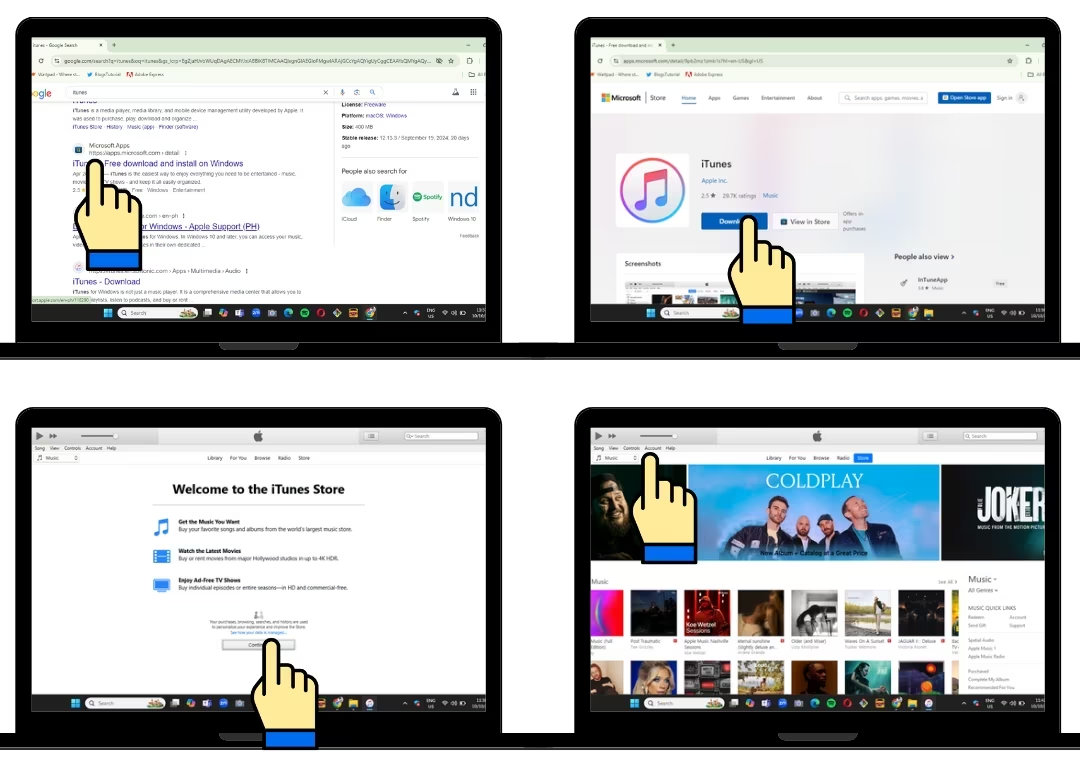
Search iTunes on your browser, then look for iTunes from Microsoft Store link from the search result. Press "Download" button. Wait for it to finish downloading then install the application (exe). After installing, open the application, press "Continue" button to be routed to iTunes homepage. To start signing up, click on the "Account" tab on the upper left corner of the page, then tap on "Sign-in".
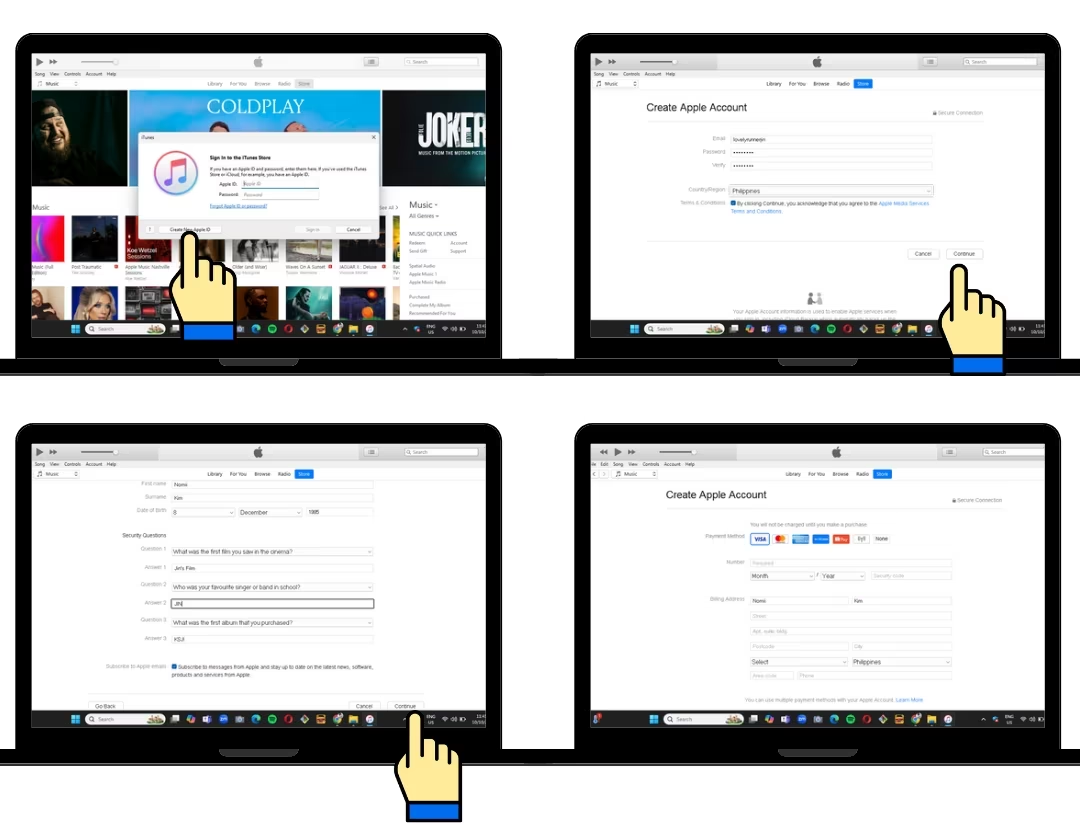
Click on "Create New Apple ID" button from the pop up box. Enter email address which will be your apple id. Create password and click on "Terms and Policy" then press the "Continue button. Input all neccessary information, you can use random infos here so you'll have different personal information every account then press "Continue" button. Attach your payment method here, remember to use different payment account per apple id.
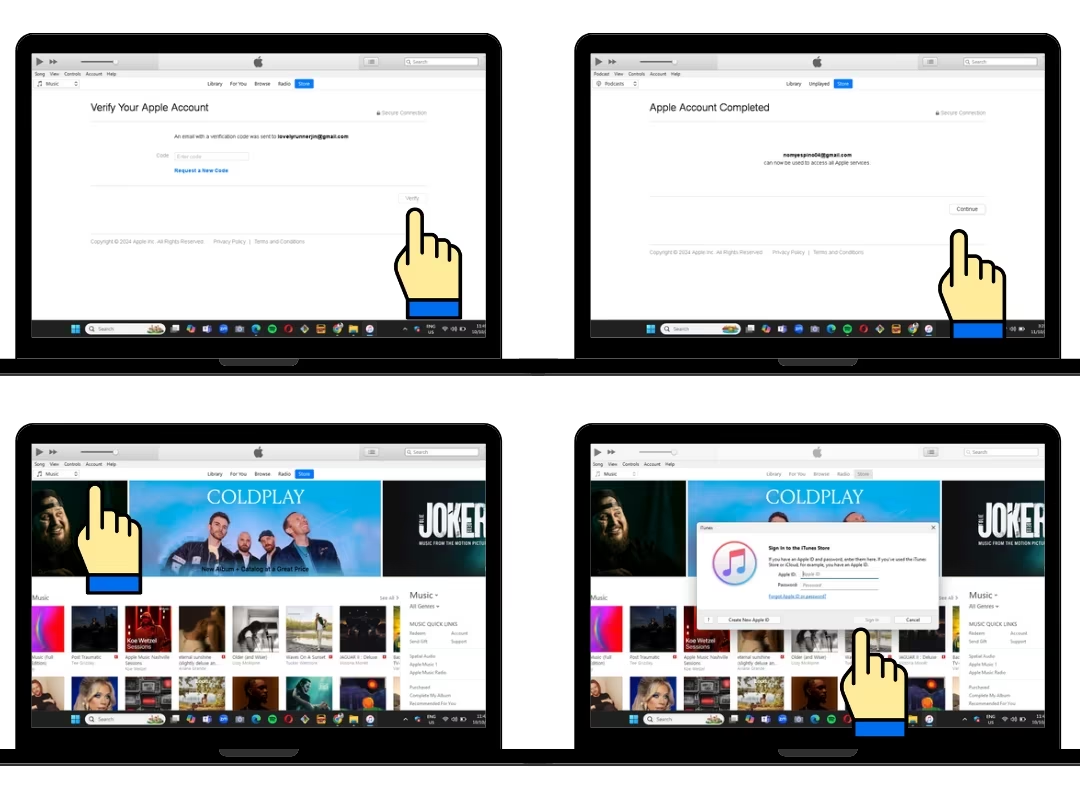
A verification code will be send to your email address, get it and input it on the box then press "Verfify" button. Press "Continue" to finish signing-up. To re-log in your iTunes accounts, just press "Account" tab on the upper left corner of the screen then tap "Sign in". Enter your email address and password then click "Sign-in."
HOW TO BUY ON ITUNES USING PHONE
1. Go to the iTunes Store: In the App Store, tap the “Music” tab at the bottom of the screen. Then, tap “iTunes Store” near the top of the screen.
2. Sign In (if necessary): If you’re not signed in, tap the “Sign In” button at the top right corner and enter your Apple ID and password.
3. Search for the Song: Tap the “Search” tab at the bottom of the screen. Enter the song title, artist, or album into the search bar at the top and tap “Search.”
4. Select the Song: Browse the search results and tap the song you want to buy.
5. Buy the Song: Tap the price button next to the song. If you haven’t added a payment method yet, you’ll be prompted to do so. Remember to purchase the song individually and not the full album.
6. Confirm Purchase: A confirmation screen will appear. Tap “Buy” to confirm your purchase. You might be prompted to authenticate with Face ID, Touch ID, or your Apple ID password.
7. Download the Song: The song will begin downloading to your iPhone. Once the download is complete, you can find the song in the Music app under “Library.
HOW TO BUY USING YOUR COMPUTER
1. Open iTunes: Launch the iTunes application on your computer. If you don’t have iTunes installed, you can download it from the Microsoft Store.
2. Sign In: In iTunes, click on the “Account” tab at the top of the screen and select “Sign In.” Enter your Apple ID and password.
3. Go to the iTunes Store: Click on the “Store” button in the top-right corner of the iTunes window to enter the iTunes Store.
4. Search for the Song: In the search bar at the top right, type the name of the song, artist, or album you want to buy, and press “Enter.”
5. Select the Song: Browse the search results and click on the song you want to purchase. The song’s price will be displayed next to it.
6. Buy the Song: Click the price button next to the song. If prompted, enter your Apple ID password to confirm the purchase.
7. Download the Song: The song will begin downloading automatically and will be added to your iTunes library.
QUBOZ
Quboz is a digital music service known for its high-resolution audio quality. It offers both streaming and digital downloads. For fans from USA, Argentina, Australia, Austria, Belgium, Brazil, Canada, Chile, Colombia, Denmark, Finland, France, Germany, Ireland, Italy, Luxembourg, Netherlands, Mexico, New Zealand, Norway, Portugal, Spain, Sweden, Switzerland, or the United Kingdom.
- Maximum of one copy per version on one account. DO NOT re-purchase same song or version using SAME email address or account. Create multiple quboz accounts with different name, payment card/method, address and phone number in advance to purchase more during release.
- In creating new accounts, use different name, phone number, address, payment information or method.
- Change your IP Address in every purchase( tutorial),or use public wifi's.
- DO NOT purchase the FULL ALBUM at once, sales won’t count this way. Buy each songs separately or individually.
HOW TO BUY SONG ON QUBOZ
- Sign Up or Log In: Visit Quboz's Website and sign up for an account or log in if you already have one.
- Search for the Song: Use the search bar to find the song you want to purchase.
- Select the Song: Click on the song or "SEE ALBUM" to view more details.
- Add song to Cart: Do not purchase the whole album, scroll until you see the option to "BUY TRACK" on the right side of the song. Select "CD QUALITY" then press "CONTINUE SHOPPING".
- Add all tracks to Cart: Repeat step 4 until you added all tracks from the album, just make sure that there is no duplicate.
- Review your cart: Go to your cart to review your selections.
- Proceed Check-out: Click on the "Checkout" or "Buy" button.
- Enter Payment Details: Provide your payment information. Qobuz typically accepts credit/debit cards and other payment methods.
- Complete Purchase: Confirm your purchase and complete the transaction.
- Download your Purchase: Once your payment is processed, you can download the song from your Qobuz library or purchase history.
BTS US STORE
BTS US Store is only for USA ARMY, if you're outside US do not purchase from here.
SINGLE RELEASE DIGITAL COPY
Digital Copy of a single release from BTS US Store DOES NOT COUNT towards billboard charts. Ex. The Astronuat digital copy by Jin.
SINGLE RELEASE PHYSICAL COPY
Physical Copy from BTS US Store of a single release is COUNTED on billboard chart. Physical copies are those that you can pick-up from the store or deliver to your house like CDS's, vynyls,etc. Ex. The Astronaut CDs.
- Maximum of 4 copies each version on one transaction or account. If you wanted to buy more, please use different account. New account must have a different name, mailing and shipping address, phone number and payment information or method. Exceeding 4 copies on each transaction under the same information is considered bulk buying that does not count.
- Change your IP Address in every purchase.
- Please remember that only sales sent to USA and Puerto Rico address counts towards Billboard 200 and Hot 100. If you're not from US, do not purchase from BTS US Store.
ALBUM RELEASE DIGITAL COPY
- Ditigal Copy of an album from BTS US Store is COUNTED on billboard charts. Ex. HAPPY album digital copy.
- Same rules applies to album, if you wanted to purchase more, use different accounts and IP Address. 1 digital album copy per account.
ALBUM RELEASE PHYSICAL COPY
- Purchase 4 copies each of version on one transaction or account to avoid bulk buying. Bulk buying does not count towards billboard.
- If you wanted to purchase more, create new account - new account must have a different name, phone number, shipping address, mailing address, payment information and IP Address.
- Physical album online purchases are counted on the Billboard 200 chart based on the shipping date rather than the purchase date.
AMAZON
DIGITAL COPY
- Maximum of 1 copy per version on one account. DO NOT re-purchase same version of the song using same amazon email or account. Billboard counts only one purchase per person per account for their charts. Create multiple accounts to purchase more.
- Make sure to always check if the sales will count towards chart, it is included on the description of the items. If BigHit provided amazon link, please utilize it.
- If it is an album release, PR/USA ARMY should buy each tracks separately or individually. DO NOT purchase the whole album at once.
- After buying 1 copy of all versions/each track on one account, switch to another account. New account must have a different name, phone number, address and payment information.
- Always change your IP Address when making a new purchase.
PHYSICAL COPY
- Maximum of 4 copies per version on one account.DO NOT purchase more than 4 copies coz it's considered as bulk buying and won't count towards chart.
- Create additional accounts if you wanted to purchase more copies, make sure to use different personal information, email address, payment method, shipping address, billing address.
- When purchasing from Amazon, use only the link Hybe / BigHit provides as other sellers may not count on Billboard 200 or check if a certain seller's affilaited with billboard.
- Do not buy if the sales won't reflect towards billboard. Utilize other platforms.
- Physical album online purchases are counted on the Billboard 200 chart based on the shipping date rather than the purchase date.
HOW TO BUY DIGITAL COPY
- Go to Amazon's Website: Open your web browser and go to Amazon Music Page.
- Sign In: Click the “Sign in” button at the top right corner of the page and enter your Amazon account credentials. If you don’t have an account, you’ll need to create one by clicking “Create your Amazon account.”
- Search for the Song: Tap on the search box on the upper center of the page then search the song title.
- Select the Song: Browse on the result, select the mp3 version. Click on the song, it will take you to the song’s or album’s detail page.
- Choose format:If you're routed on the album page, scroll until you see the song you wanted to purchase. Click the three dots on the right corner of the song and choose "BUY MP3 SONG" and not the album.
- Select Payment Method: Choose your payment method. You can use a credit/debit card or Amazon gift card. Enter your payment details if they’re not already saved.
- Confirm Purchase: Review your purchase details and click the “Place your order” button to complete the transaction.
- Download Your Song: Once your purchase is complete, you can download the song by going to “Your Music Library” or the “Digital Orders” section of your Amazon account.
HOW TO BUY PHYSICAL COPY
- Go to Amazon’s Website: Open your web browser and navigate to Amazon's homepage.
- Sign In: Click the “Sign in” button at the top right corner of the page and enter your Amazon account credentials. If you don’t have an account, you’ll need to create one by clicking “Create your Amazon account.”
- Search for the Album or Artist: Use the search bar at the top of the page to find the album, CD, or vinyl record you’re interested in purchasing. You can search by album title, artist, or keywords related to the music.
- Select the Physical Format: On the search results page, look for the album in the format you want (CD, Vinyl, etc.). Click on the album to go to its product detail page.
- Check the Details: Review the product details to ensure it’s the correct version and format. Check the availability and estimated delivery dates.
- Add to Cart: Click the “Add to Cart” button if you want to add more items before checking out. If you’re ready to buy, you can also click “Buy Now” for a quicker checkout process.
- Review Your Cart: If you added the item to your cart, click on the cart icon at the top right of the page to review your order. Ensure that the quantity and item details are correct.
- Proceed to Checkout: Click the “Proceed to checkout” button when you’re ready to complete your purchase.
- Enter Shipping Address: If prompted, enter or select your shipping address. You can ship to your home, work, or another location. Make sure the address is correct.
- Select Shipping Method: Choose your preferred shipping option (e.g., standard, expedited, two-day). The delivery speed will affect the final price.
- Choose Payment Method: Select your payment method (credit/debit card,etc.). Enter your payment details if they’re not already saved in your account.
- Review and Place Your Order: Review your order summary, including the item, shipping details, and payment method. If everything looks correct, click the “Place your order” button.
- Order Confirmation: You’ll receive an order confirmation on the screen and via email. This confirmation will include your order number and expected delivery date.
7DIGITAL
7Digital is a digital music retailer that provides a platform for purchasing and downloading music. It offers high-quality audio files and an extensive catalog of tracks and albums.
- DO NOT re-purchase same song or version using SAME email address or account. You can only purchase ONCE per song/version on one email address or account. Create multiple 7digital accounts in advance to purchase more during release.
- DO NOT purchase the FULL ALBUM at once, sales won’t count this way. Buy each song/track separately or individually.
- Change IP Address in every purchase.
HOW TO BUY on 7Ditigal
- Visit the Website or App: Visit 7Digital's Website or open the 7digital app if you have it installed.
- Create an Account or Log In: If you don’t have an account, you’ll need to sign up. Click on the "Sign Up" or "Register" button and follow the prompts to create an account. If you already have an account, click on "Log In" and enter your credentials.
- Browse or Search for Music: Use the search bar to find a specific song or album, or browse through categories and charts to discover new music.
- Select the Song: Once you find the song you want to purchase, click on it to view the details.
- Add to Cart: Click the "Add to Cart" button next to the song. You can continue shopping or proceed to checkout if you’re done.
- View Cart: Click on the cart icon (usually in the top right corner) to review your selections.
- Proceed to Checkout: Click the "Checkout" button to begin the payment process.
- Enter Payment Information: Provide your payment details. 7digital typically accepts various payment methods such as credit/debit cards and sometimes PayPal.
- Review and Confirm: Double-check your order details and payment information. Confirm your purchase by clicking the appropriate button, usually labeled "Confirm" or "Place Order."
- Download your Purchase: After your purchase is complete, you’ll be provided with a download link or the option to download directly from your account’s purchase history. Click the download link to save the song to your device.
WEVERSE
Get physical copy from Weverse USA to help Jin on Billboard charts.
- Physical album online purchases are counted on the Billboard 200 chart based on the shipping date rather than the purchase date.
- Maximum of 4 copies each version on one transaction or account. If you wanted to buy more, please use different account. New account must have a different name, mailing and shipping address, phone number and payment information or method.
- Change your IP Address in every purchase.
- Weverse Exclusive counts towards billboard and not the Weverse album version. Please make sure to check before purchasing.
- If you're from USA, make sure to switch to Weverse USA, for international, switch to Weverse Global or Japan.
- Weverse USA sales counts towards Billboard and Circle Chart. Weverse Global and Japan sales counts towards Hanteo.
- Please remember that only sales sent to USA and Puerto Rico address counts towards billboards chart. If you're not from US, do not purchase from Weverse USA.
TARGET
IN STORE PURCHASES:
- It is advisable to visit local stores during the first charting week to make sure that your sales would count towards that week's billboard tracking week.
- Maximum of 4 copies each album versions per customer or transaction. You can visit other stores to buy again.
- It is recommended to pay in cash, as card transactions can be tracked for bulk purchases.
- Buying physically in store can be done up until end of tracking week, every Thursdays at 11:59 PM EST.
- In-store reservations that aren't picked up before the deadline don’t count.
ONLINE PURCHASES:
- Physical album online purchases are counted on billboard charts based on the shipping date rather than the purchase date. Tracking week starts from Friday to Thursday. Your orders must be shipped out on or before Thursday of the tracking week at 11:59PM EST.
- Maximum of 4 copies each version on one transaction or account. If you wanted to buy more, please use different account. New account must have a different name, mailing and shipping address, phone number and payment information or method.
- Change your IP Address in every purchase.
- Pre-orders that are not shipped within the tracking week don’t count yet.
- Please remember that only sales sent to USA and Puerto Rico address counts towards billboard charts.
WALMART
IN STORE PURCHASES:
- It is advisable to visit local stores during the first charting week to make sure that your sales would count towards that week's billboard tracking week.
- Maximum of 4 copies each album versions per customer or transaction. You can visit other stores to buy again.
- It is recommended to pay in cash, as card transactions can be tracked for bulk purchases.
- Buying physically in store can be done up until end of tracking week, every Thursdays at 11:59 PM EST.
- In-store reservations that aren't picked up before the deadline don’t count.
ONLINE PURCHASES:
- Physical album online purchases are counted on billboard charts based on the shipping date rather than the purchase date. Tracking week starts from Friday to Thursday. Your orders must be shipped out on or before Thursday of the tracking week at 11:59PM EST.
- Maximum of 4 copies each version on one transaction or account. If you wanted to buy more, please use different account. New account must have a different name, mailing and shipping address, phone number and payment information or method.
- Change your IP Address in every purchase.
- Pre-orders that are not shipped within the tracking week don’t count yet.
- Please remember that only sales sent to USA and Puerto Rico address counts towards billboard charts.
BARNES & NOBLE
IN STORE PURCHASES:
- It is advisable to visit local stores during the first charting week to make sure that your sales would count towards that week's billboard tracking week.
- Maximum of 4 copies each album versions per customer or transaction. You can visit other stores to buy again.
- It is recommended to pay in cash, as card transactions can be tracked for bulk purchases.
- Buying physically in store can be done up until end of tracking week, every Thursdays at 11:59 PM EST.
- In-store reservations that aren't picked up before the deadline don’t count.
ONLINE PURCHASES:
- Physical album online purchases are counted on billboard charts based on the shipping date rather than the purchase date. Tracking week starts from Friday to Thursday. Your orders must be shipped out on or before Thursday of the tracking week at 11:59PM EST.
- Maximum of 4 copies each version on one transaction or account. If you wanted to buy more, please use different account. New account must have a different name, mailing and shipping address, phone number and payment information or method.
- Change your IP Address in every purchase.
- Pre-orders that are not shipped within the tracking week don’t count yet.
- Please remember that only sales sent to USA and Puerto Rico address counts towards billboard charts.